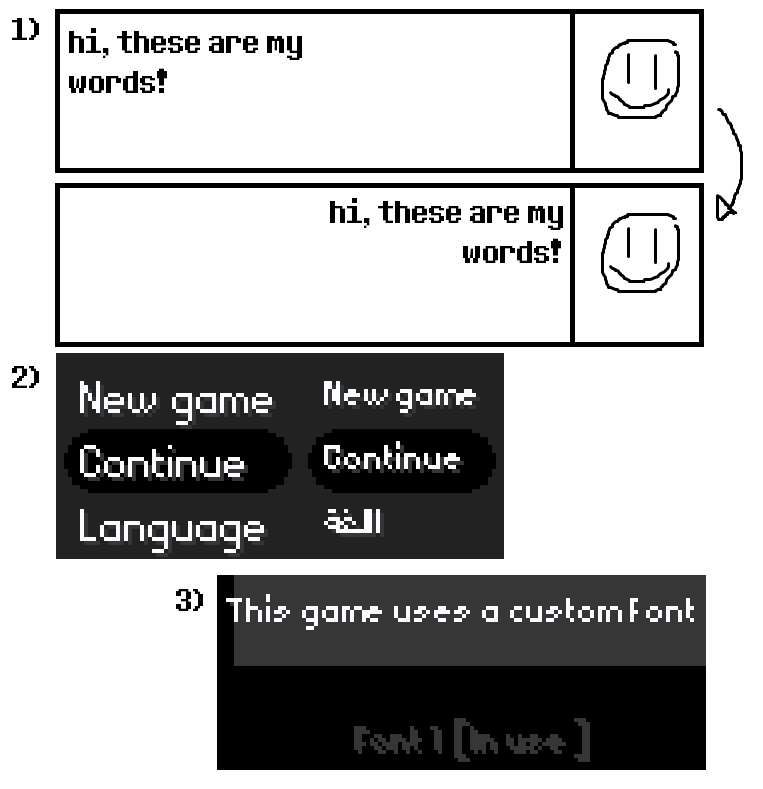
No, not RTL. Text alignment.
Quick context, I’m making an Arabic translation to a game I like, and I want it to be pretty high effort, so I want to change the text alignment.
How would I go on about doing that? [visual example below]
Let me know if there’s some kind of patch or obvious setting or even something I can edit in the source code that will let me change the text alignment, thank you!
BONUS QUESTION: How do I change the default font size for a language?
I know how to change the default font size for the default English language, but once I change to the Arabic language I set up, it shrinks to 12px no matter what.
Plus, the way to change the font size right now is saved in the %AppData% folder, meaning if I try to ship this translation, the font size will reset again. [visual example below]
I tried the commandline arguments but the font size ones don’t seem to work, and besides, again, I’m looking to ship this translation without forcing the user to do a bunch of useless steps to enjoy the game.
Is there a permanent fix?
Visual Examples (fitted into one image due to limitations):
- Right alignment example of how I want my text to look (I don’t want to simulate this alignment by using a bunch of spaces by the way)
- Difference between default English font size and my Arabic’s font size (Left, 16px - Right, 12px - Both same font: PixelAE)
- Option to change font size while this language is equipped is greyed out (and even if it wasn’t, it’s not a permanent fix sadly)