(not specifically easy rpg btw just general 2k3 advice)
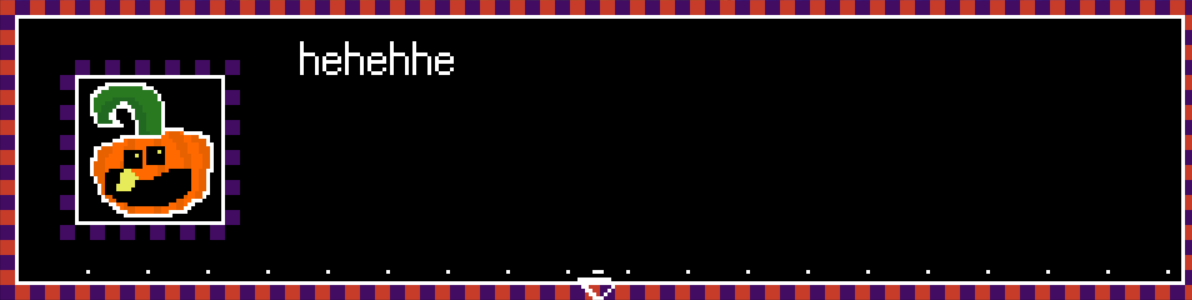
Consistent issue ive ran into is parts of sprites going invisible and idrk how to fix it.
(the pumpkin guy’s outline is supposed to look the same as the textbox)
on a similar note whats up with these white dots in the menu for the texture I made? how do I fix that?
Could you share the System and FaceSet files that you are using to see what the problem is?
Pretty sure you’re having what’s supposed to be red in the face frame set as transparent color (index 0). RM does this, somewhat surprisingly, for FaceSet graphics too, enabling faces without background (however jagged edges still). Usually you will need to account for it by including a throwaway color in an unused space in the image, then set it as the transparent one during importing. Or, I’m not familiar with specific programs for this, but certainly some graphics editor will let you edit the indexed color palette directly, and you’d have to make sure index 0 is a color not used in what you want to display. Alternatively, if using Maniacs or EasyRPG, you can use 32bit-graphics and the whole indexing shenanigan is no longer an issue.
The white dots look like they were of the slightly wrong color – if there’s a white background to be erased from the message box graphic, and those pixels happen to be a ever so slightly different color even if not visible to the naked eye, RM will consider them distinct and thus they stay behind. In that case the fix is easy, just make sure that everything you want to be transparent has the exact same (and only one) color.